
Handling messages
This page declares a command, writes a handler for it, registers the handler with the bus and sends the command. It uses a hotel booking application, where a ReserveRoom command reserves a room and publishes RoomReserved once it's done.
Declare the messages
A command is a class that extends
Command, with a staticNAMEthat the bus routes it by. Events extendEventthe same way.tsimport { Command, Event } from '@node-ts/bus-messages' export class ReserveRoom extends Command { static NAME = 'reservations/reserve-room' $name = ReserveRoom.NAME $version = 0 constructor( readonly roomId: string, readonly bookingId: string ) { super() } } export class RoomReserved extends Event { static NAME = 'reservations/room-reserved' $name = RoomReserved.NAME $version = 0 constructor( readonly roomId: string, readonly bookingId: string ) { super() } }Write a handler
handlerFordeclares a function that handles one type of message. It's called with the message, its attributes and aHandlerContext, which sends and publishes through the bus that received the message.tsimport { handlerFor } from '@node-ts/bus-core' import { ReserveRoom, RoomReserved } from '../messages' import { reservationService } from '../services' export const reserveRoomHandler = handlerFor( ReserveRoom, async (command, _attributes, ctx) => { await reservationService.reserveRoom(command.roomId, command.bookingId) // Published once the handler resolves, and dropped if it throws await ctx.publish(new RoomReserved(command.roomId, command.bookingId)) } )TIP
Keep handlers thin and delegate the work to your own services. That keeps the messaging concerns of your application apart from the work it does.
Register the handler and send the command
tsimport { Bus } from '@node-ts/bus-core' import { reserveRoomHandler } from './handlers/reserve-room-handler' import { messageTypes } from './message-types.generated' import { ReserveRoom } from './messages' const bus = Bus.configure() .withMessageTypes(messageTypes) .withHandler(reserveRoomHandler) .build() await bus.initialize() // Start the bus to begin handling messages await bus.start() await bus.send( new ReserveRoom( '63a65cf0-d239-4b83-96da-f33f013db23a', '12b85a56-e929-47a8-9ac3-e87739d5d215' ) )
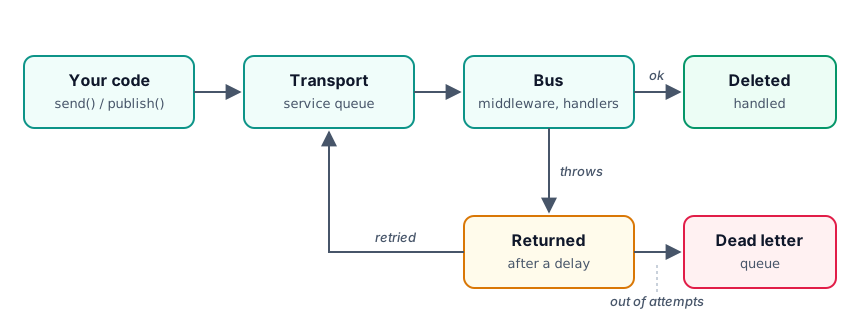
When the handler resolves, the message is deleted from the queue, and RoomReserved is published. If it throws, RoomReserved is dropped and the message goes back on the queue to be retried, as described in Retry strategies.
Testing a handler
A handler is a plain function, and HandlerContext is an interface, so a test can call the handler with a fake context. messageAttributes() from @node-ts/bus-messages fills in empty attributes.
import { HandlerContext } from '@node-ts/bus-core'
import { Event, messageAttributes } from '@node-ts/bus-messages'
import { deepStrictEqual } from 'node:assert'
import { reserveRoomHandler } from './handlers/reserve-room-handler'
import { ReserveRoom, RoomReserved } from './messages'

// In a test, with any test runner
const published: Event[] = []
const ctx: HandlerContext = {
  correlationId: 'test',
  send: async () => {},
  publish: async event => {
    published.push(event)
  },
  failMessage: async () => {},
  returnMessage: async () => {}
}

await reserveRoomHandler.messageHandler(
  new ReserveRoom('room-1', 'booking-1'),
  // Empty attributes and sticky attributes
  messageAttributes(),
  ctx
)

deepStrictEqual(published, [new RoomReserved('room-1', 'booking-1')])
See also
- Messages, for commands, events and messages declared without a class
- Message attributes, for the metadata that travels with a message
- Shutting down cleanly